
Stick Merge Unblocked — Play Free Online
More Craft, Merge and Idle games







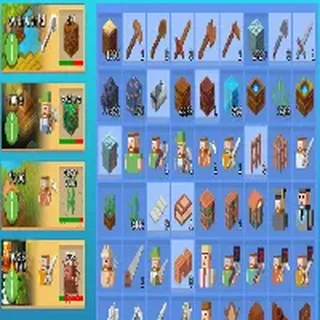




Stick Merge unblocked: play Stick Merge online free right here in your browser — no download, no sign-up, works on a school Chromebook.
Stick Merge combines the tidy satisfaction of an item merger with the fast reflexes of an arcade gallery shooter. Instead of simply building an endless chain of recipes for passive points, every gun you craft on the workbench goes directly into combat. You assemble higher-tier firearms on a bottom grid, equip them onto your stickman agent, and take aim at advancing waves of enemy stick figures.
The pace shifts seamlessly between two distinct rhythms. Between gunfights, you take your time matching identical pistols, submachine guns, and rifles to free up grid space and unlock higher damage stats. Once you step into the shooting range, the action becomes immediate: enemy targets pop up behind cover, requiring steady aim and quick target prioritization before they return fire.
For players visiting Little Alchemy 2 who enjoy gradual recipe discovery but want a faster active payoff, Stick Merge offers a compelling loop. It rewards both patient planning on the merge board and sharp hand-eye coordination under pressure.
How to play
Everything in Stick Merge is controlled with the mouse or a single touch point:
- Merge weapons: Click and drag one gun onto an identical copy on the workbench grid to combine them into a higher-level firearm.
- Equip your fighter: Drag your highest-tier weapon onto the stickman character stationed above the board.
- Aim and fire: Move your cursor or finger over incoming enemy targets on the range to aim your crosshair and eliminate them.
- Collect coins: Defeated enemies drop coins that you can spend to buy additional weapon crates and upgrade your base stats.
Tips for cleaner runs
- Aim for the head: Headshots deal significantly more damage than body shots, allowing you to drop heavily armored stickmen before they can retaliate.
- Keep an empty tile: Avoid filling every square on your workbench with low-level weapons. Keeping one or two tiles clear ensures you always have room to drop and shift new crates without stalling your merge chain.
- Upgrade before tough waves: If enemies begin surviving multiple hits, spend your banked gold on upgrading base weapon spawns rather than buying individual low-tier guns one by one.
Similar games on Little Alchemy 2
If you enjoy the merging mechanic but want different pacing, several other titles on Little Alchemy 2 share the same core logic. Merge Cakes offers a purely relaxed crafting experience with bakery treats and zero combat pressure. GrindCraft Remastered focuses on deep resource crafting trees inspired by survival sandboxes, while 2048 delivers a clean number-sliding puzzle for pure numerical optimization.
Stick Merge runs directly in any modern desktop or mobile web browser with no download or setup required. Progress saves automatically in your local browser cache, making it easy to drop in for a quick wave or spend an extended session unlocking the full arsenal.
Questions about Stick Merge
Is Stick Merge unblocked at school?
Stick Merge runs in an ordinary browser tab from littlealchemy2.org, with nothing to download or install, so it plays on most school Chromebooks and work computers. If a network filter blocks the site, only that network's administrator can change it.
How do you merge guns in Stick Merge?
Click or tap and drag two identical weapons on your workbench together. They will combine into a higher-tier weapon with increased fire rate and damage.
How do you aim and shoot enemies?
After equipping a weapon onto your stickman, use your mouse cursor or finger to target incoming enemies on the shooting range. Headshots deal critical damage.
Does Stick Merge save your progress?
Yes, your unlocked weapons, coins, and upgrades save automatically to your local browser storage, so you can resume your game anytime on the same device.
Can you play Stick Merge on mobile devices?
Yes, Stick Merge runs directly in any modern mobile or desktop web browser with responsive touch and mouse controls and no installation needed.
More games
 Cat Clicker RE
 Kiwi Clicker
 Idle Money Tree
 Coin Machine
 Cookie Clicker
 One Line Draw
 Connect Puzzle
 Online Sudoku
 Tiles Master
 Bad Ice Cream
 Sugar, Sugar 2
 Bloku
Bloku Bloxorz
 4 Pics 1 Word
 Hangman
 Guess the Emojis
 Word Chains
 Popular Words
 Trivia Crack
 Slope Tunnel
 Flappy Bird
 OvO 2
OvO 2 Elastic Face
 Tunnel Rush
 Basket Random
 Cars Lightning Speed
 Basketball Legends