
Craftomation 1 Unblocked — Play Free Online
More Craft, Merge and Idle games









Craftomation 1 unblocked: play Craftomation 1 online free right here in your browser — no download, no sign-up, works on a school Chromebook.
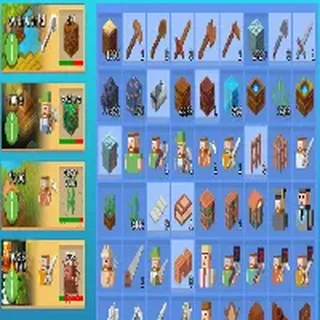
Craftomation 1 drops you onto a desolate, frozen alien landscape with a single tiny robot helper and a spark of fire. Your mission is survival and terraformation: harvesting frozen materials, igniting bonfires to melt surrounding frost, and unlocking new technological tiers. Unlike traditional clickers or merge games where manual tapping dominates, this game shifts early into visual programming and automated logistics.
For fans of Little Alchemy 2 who enjoy the thrill of discovering recipe combinations from basic elements, Craftomation 1 provides a natural, logical evolution. You still combine ingredients to produce novel items—such as turning sulfur and spark into heated embers—but you quickly delegate repetitive crafting steps to autonomous machines. The result is a satisfying loop where every solved puzzle compounds into a self-sustaining base.
How to play
You interact with the world entirely through your mouse or touchscreen. The gameplay loop centers on programming instructions for your robots:
- Select and inspect: Click on a CraftoMate robot to open its visual command panel.
- Assemble visual code: Drag command blocks onto the canvas and connect them sequentially. Common instructions include picking up items from adjacent tiles, dropping them onto craft tables, and evaluating conditions.
- Fuel and warmth: Keep your main fire pit supplied with flammable materials. Robots freeze if they wander too far from heat sources, making thermal management essential.
- Run and debug: Press the play button to activate your robot. Watch its pathfinding and adjust command loops if the robot runs out of resources or gets stuck.
Tips for efficient automation
- Keep command loops short: Build small, single-purpose routines for each robot instead of one giant script. A robot dedicated solely to hauling wood to a storage pile is easier to troubleshoot than one attempting multi-step synthesis.
- Establish thermal relay stations: Bonfires have a limited radius of warmth. Place secondary fires or warm spots along heavy transit routes so your automatons do not freeze mid-delivery.
- Organize your workspace: Dedicate distinct ground tiles for raw materials, intermediate parts, and finished products. Clean layouts prevent pathing bottlenecks and keep conditional checks simple.
Similar games on Little Alchemy 2
If you enjoy the resource synthesis and progression loops of Craftomation 1, several other titles on Little Alchemy 2 offer related experiences. Little Alchemy 2 focuses purely on elemental combination logic without machine coding. GrindCraft Remastered delivers a grid-based crafting progression inspired by classic survival games, while Sandbox of Elements lets you experiment directly with interactive physics and elemental reactions.
Craftomation 1 runs directly in your web browser with no installation required. Your colony layout and robot code save automatically in local browser storage, making it well suited for both quick optimization sessions and relaxed, long-term engineering experiments.
Questions about Craftomation 1
Is Craftomation 1 unblocked at school?
Craftomation 1 runs in an ordinary browser tab from littlealchemy2.org, with nothing to download or install, so it plays on most school Chromebooks and work computers. If a network filter blocks the site, only that network's administrator can change it.
How do you program robots in Craftomation 1?
Click any CraftoMate robot to open its programming panel, then drag and snap visual instruction blocks into sequential order to direct where it moves, what it picks up, and how it crafts.
Why do robots freeze and stop working?
Robots require warmth to stay functional on the frozen planet. If a robot wanders outside the heated perimeter of a bonfire or runs out of nearby fuel, it freezes until warmed again.
Does Craftomation 1 save your progress automatically?
Yes, all your robot programs, unlocked crafting recipes, and terraformed tiles are saved automatically in your browser storage so you can resume your colony at any time.
More games
 Evolution
 Cat Clicker RE
 Kiwi Clicker
 Spider Solitaire
 World's Hardest Game
 67 Game
 Block the Pig
 Fun Water Sorting
 One Line Draw
 Connect Puzzle
 Online Sudoku
 Tiles Master
 Bad Ice Cream
 Sugar, Sugar 2
 Bloku
Bloku Bloxorz
 4 Pics 1 Word
 Hangman
 Guess the Emojis
 Word Chains
 Popular Words
 Trivia Crack
 Slope Tunnel
 Flappy Bird
 OvO 2
OvO 2 Elastic Face
 Tunnel Rush